AI Factory turns everyday Jira tickets into autonomous development orders. Adding the C3 Code Factory label routes an issue directly into the Agent Queue—where coding agents reproduce the bug, ship a patch, and stage a live preview in the Inspection Queue for a developer to verify.
UI polish bugs, scroll flickers, and layout regressions often sit in backlog triage because context-switching is expensive. With AI Factory, designers and engineers file a clear Jira ticket with reproduction steps, apply the C3 Code Factory label, and let autonomous agents handle the implementation loop.
Label in Jira
Add the C3 Code Factory label to any Jira issue (e.g. PLAT-160847) with steps to reproduce.
Agent Queue
Ticket auto-ingests into the Queued column and provisions a workspace agent (Starting agent).
Autonomous Fix
Agent moves to In Process, reproduces the issue, writes the code fix, and opens a pull request.
Inspection Queue
Order lands in Inspection with a live Preview link so a developer can verify and merge.
As soon as tickets are tagged with C3 Code Factory, they populate the Queued column on the Factory board. Team members can filter the board by assignee initials at the top, monitor run count and dollar cost per card, and launch a live preview environment directly from the card footer.
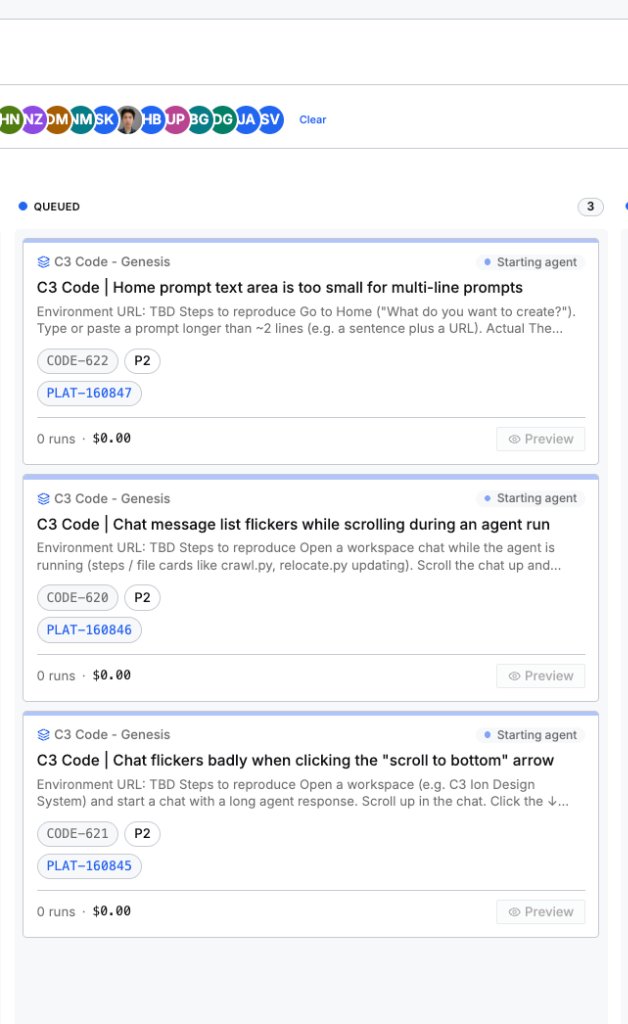
Each card links both the local issue key (CODE-622, CODE-620, CODE-621) and the platform Jira ticket (PLAT-160847, PLAT-160846, PLAT-160845) alongside priority badges.
Cards display the target application (C3 Code - Genesis) and real-time provisioning state (Starting agent) before transitioning to In Process.
Every order tracks agent attempts and compute spend (0 runs · $0.00 at queue time, updating as tokens are consumed) so teams can audit ROI across the fleet.
Once the agent finishes its run and moves the card to the Inspection column, the Preview button opens the running sandbox build for human sign-off.
Here are two of the actual UI bugs captured and labeled C3 Code Factory in the queue above—demonstrating how visual interaction glitches are documented and handed off to the agents.
↓ jump-to-bottom button triggers severe layout/scroll thrashing. Tagged C3 Code Factory for autonomous debugging and verification.
Once the C3 Code Factory agent picks up the scroll-flicker ticket, it traces the bug down to a conflict between a MutationObserver smooth-scroll loop and an in-flow 89px sticky header, ships a PR with 11 unit tests, and writes the structured Root Cause Assessment back to Jira—automatically moving the ticket from Open → In progress → In Review.
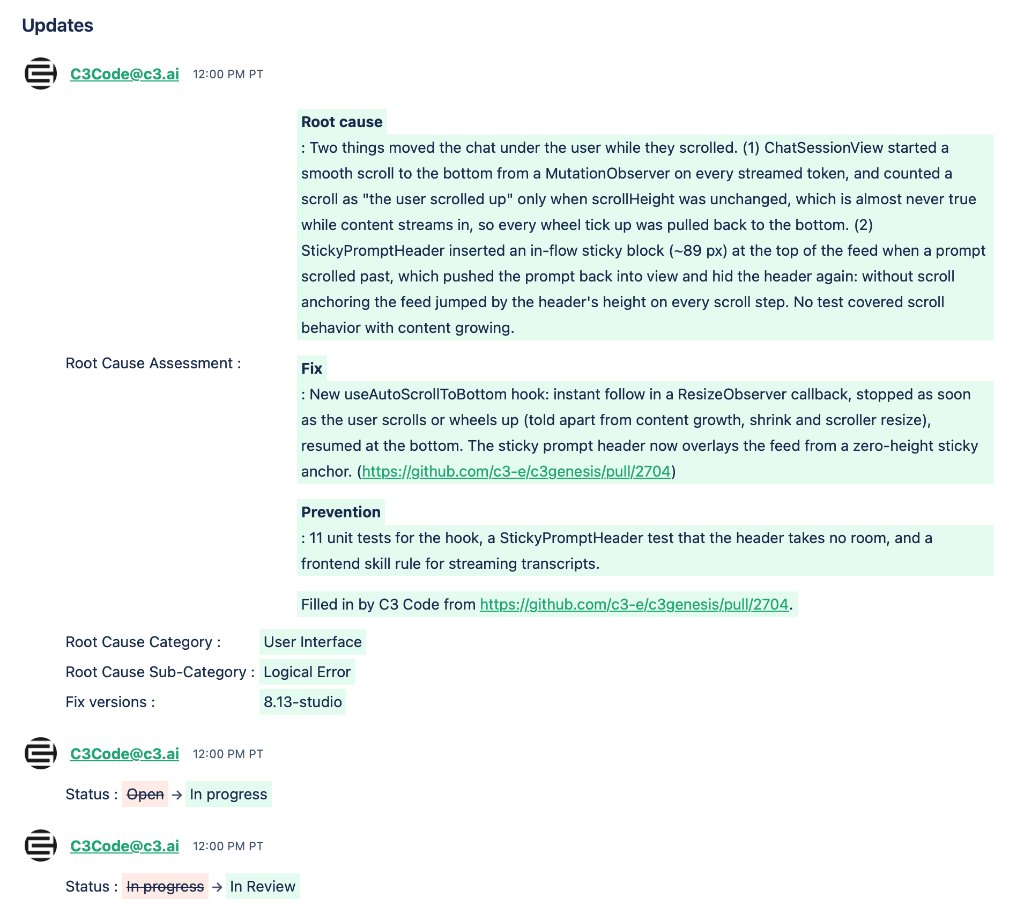
The agent identified two interacting bugs: ChatSessionView firing smooth scrolls on every streamed token while scrollHeight grew, and StickyPromptHeader inserting an 89px in-flow block that caused scroll-step jumping.
Extracted a dedicated useAutoScrollToBottom hook using ResizeObserver that immediately yields when a user wheels up, and converted the sticky prompt header to a zero-height overlay anchor.
Beyond fixing the bug, the agent added 11 unit tests, a layout assertion for StickyPromptHeader, and a new frontend skill rule for streaming transcripts so future agents never repeat the pattern.
C3Code@c3.ai populates the required Root Cause Assessment fields, links GitHub PR #2704, sets the fix version (8.13-studio), and transitions the Jira status to In Review for the Inspection Queue.
 Jason Bedient